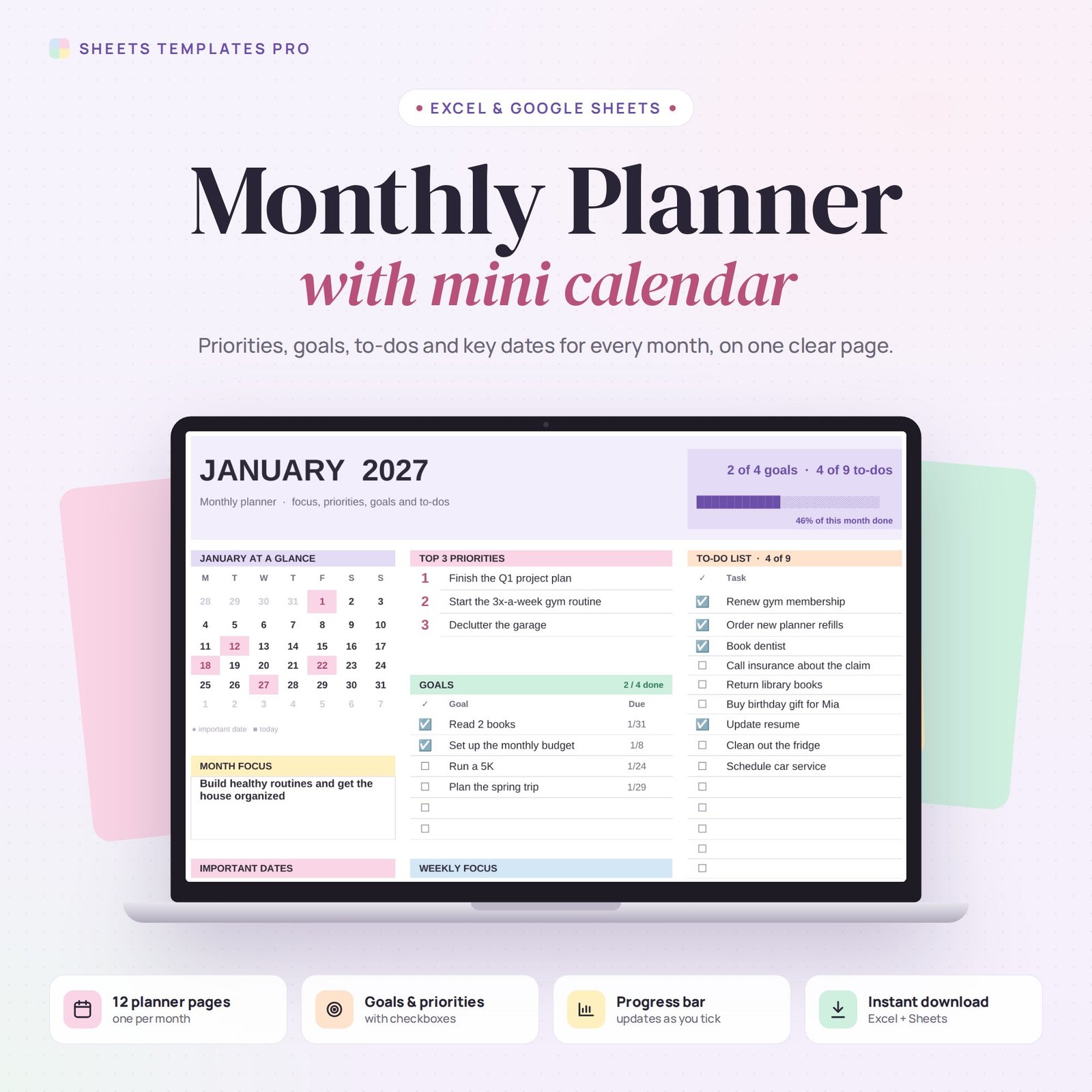


This monthly planner template puts your whole month on a single page. Each month has a mini calendar, your top 3 priorities, goals with due dates, a weekly focus, a to-do list, notes and a short review. Tick things off and the progress bar at the top updates on its own.
Who this template is for
- Students and professionals who plan goals month by month
- Anyone moving from a paper planner to a digital one
- Freelancers who track priorities and deadlines
Features
- 12 planner pages, January to December, linked to one year drop-down (2024 to 2040).
- Mini calendar on every page, with your important dates in pink and today highlighted.
- Top 3 priorities and a month focus box to keep the big things in view.
- Goals with checkboxes and due dates. Missed due dates turn red; finished goals are crossed out.
- Weekly focus with the date range of each week already filled in.
- To-do list with 18 checkboxes and a running count.
- Monthly progress bar that combines goals and to-dos.
- Year Overview tab with the focus and progress of every month.
- Monday or Sunday start, your choice.
How to use your monthly planner
- Download the file right after checkout.
- Open it in Excel, or upload it to Google Drive and open it with Google Sheets.
- On the Overview tab, pick the year and your week start.
- Fill in each month and tick items off as you go.
What's included
- 1 Excel file (.xlsx) with 14 tabs: a Start Here guide, a Year Overview and 12 monthly pages (January has example content).
- Automatic formulas, no macros.
- Print-ready: each month fits on one page.
Compatibility
Works in Microsoft Excel for Microsoft 365 (Windows and Mac) and in Google Sheets. The checkboxes use Excel's built-in checkbox feature.
FAQ
How is this different from a monthly calendar?
A calendar shows days. This planner is for goals, priorities and to-dos, with a small calendar for reference.
Can I reuse the planner next year?
Yes. Change the year on the Overview tab and every page updates.
Is this a subscription?
No. It is a one-time purchase and the file is yours to keep.
Does it work in the free version of Google Sheets?
Yes. Upload the .xlsx file to Google Drive and open it with Google Sheets. A free Google account is all you need.
Can I use it on a Mac, iPad or phone?
Yes. It works in Excel for Mac and Windows, Excel online and the Google Sheets app. For editing, a computer or tablet is the most comfortable.
How do I get the file?
Right after checkout you get a download link on the confirmation page and by email.
More templates like this: Monthly Calendars.
This is a digital product. No physical item will be shipped.


Reviews
There are no reviews yet.