
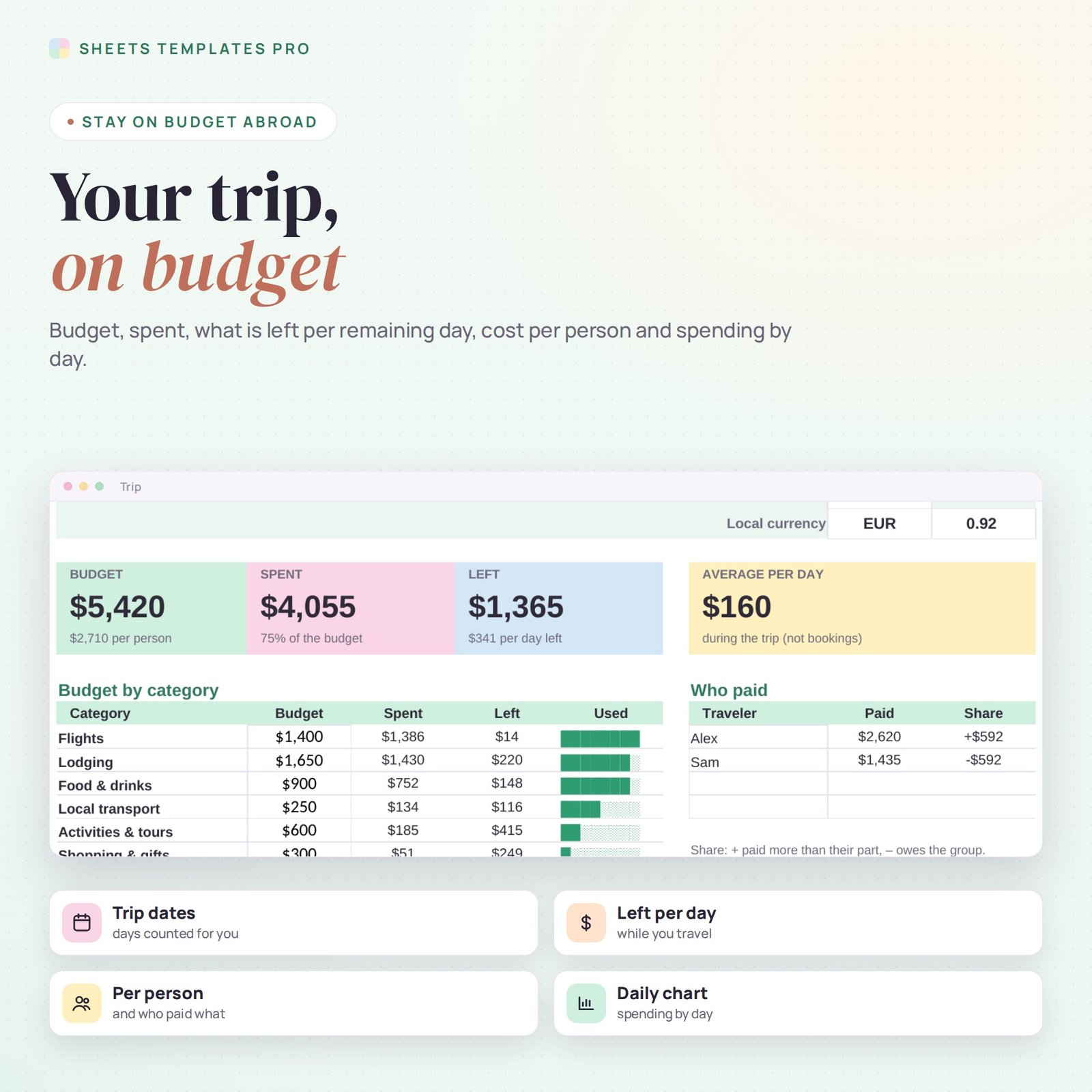


Plan your trip budget before you go and keep it on track while you travel. This travel budget template sets a budget for every category, logs each expense in dollars or the local currency, converts it for you and shows how much you can still spend per day. It works in Excel and Google Sheets, on your laptop or phone.
Who this template is for
- Families planning a vacation
- Friends splitting group trip costs
- Solo travelers on a budget
Features
- Trip setup – destination, dates, number of travelers, local currency and exchange rate.
- 8 budget categories – flights, lodging, food & drinks, local transport, activities, shopping, insurance and other, with progress bars.
- Any currency – pick USD or Local for each expense and the dollar amount is calculated.
- Left per day – what you can still spend each remaining day of the trip.
- Cost per person and who paid – up to 4 travelers, with who owes whom.
- Spending by day chart – for trips up to 21 days.
- Expense log for 300 entries – date, category, description, amount, currency, who paid and notes.
How to use it
- On the Trip tab, type your destination, dates, travelers and the exchange rate.
- Set a budget for each category.
- Log every expense on the Expenses tab as you go, in USD or local currency.
- Check the Trip tab to see what is left per day and who paid what.
What’s included
- Travel budget spreadsheet (.xlsx) with Start Here guide, Trip dashboard and Expenses log
- Sample trip you can clear in seconds
Compatibility
Microsoft Excel 2016 or later (Windows and Mac), Excel for the web and Google Sheets (also on the Google Sheets mobile app). No macros, no add-ons.
FAQ
Can I use it for a road trip in the US? Yes. Enter everything in USD and leave the exchange rate as it is.
Where do I find the exchange rate? Use the rate from your bank or card app and update it whenever you like.
Can I reuse it for my next trip? Yes. Clear the expenses and change the trip details.
Does it work in the free version of Google Sheets?
Yes. Upload the .xlsx file to Google Drive and open it with Google Sheets. A free Google account is all you need.
Can I use it on a Mac, iPad or phone?
Yes. It works in Excel for Mac and Windows, Excel online and the Google Sheets app. For editing, a computer or tablet is the most comfortable.
How do I get the file?
Right after checkout you get a download link on the confirmation page and by email.
More templates like this: Expense & Bill Trackers.
This is a digital product. You will receive a download link after purchase. No physical item will be shipped.


Reviews
There are no reviews yet.